Flatten
 When importing vector art from outside sources, it will be
unlikely that the shapes are truly ready for use in embroidery. Often times in
the creation of vector art it is expedient for the artist to layer one shape on
top of another. In graphic arts, only the final visible items will have any
impact on the result, so any shape or any part of a a shape may be hidden
without consequence. In embroidery, those shapes, as they exist, will be used.
This means there will be a tremendous amount of overlap. The Flatten command
clips the shapes against each other so that only one top layer remains. Remember
that registration issues will occur when you sew these objects, so you will
likely need to do some editing.
When importing vector art from outside sources, it will be
unlikely that the shapes are truly ready for use in embroidery. Often times in
the creation of vector art it is expedient for the artist to layer one shape on
top of another. In graphic arts, only the final visible items will have any
impact on the result, so any shape or any part of a a shape may be hidden
without consequence. In embroidery, those shapes, as they exist, will be used.
This means there will be a tremendous amount of overlap. The Flatten command
clips the shapes against each other so that only one top layer remains. Remember
that registration issues will occur when you sew these objects, so you will
likely need to do some editing.

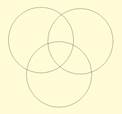
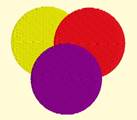
On the left is a graphic created
and saved as an SVG. The middle is the import of the SVG – notice the artist
used three circles to create the design, which seems reasonable enough. If we
make them all fills (and set colors, if needed) as we have on the right, it
looks okay…
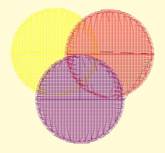
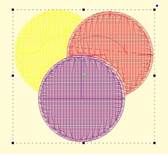
…But there is a problem. The design on the left is shown with
3D off so you can easily see the overlapping stitches. Once we use Flatten, as
in the design on the right, we are closer to having something that will sew
without damaging our needle or machine.