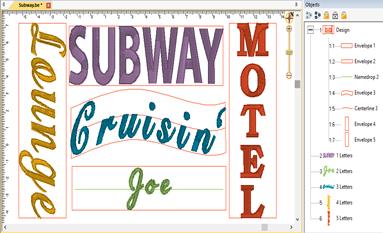
You can design templates for lettering to use in name drops, word walls, subway art, etc. Templates are interactions between two different elements: A lettering design, and a template object. To accommodate multiple template designs on a page, the template and lettering items are named using a numbering system that will match them together.
The lettering works with the built-in fonts or any .BX fonts. The templates work with lettering of a normal single-line style only. Template objects must be native objects from the Create Mode of the platform, and the stitch type must be Line, not Run or other stitch type. Template objects may be drawn if you have the tools, or if a .BE working file has template objects within it, you can use those.
There are three types of template objects: Namedrop, Envelope and Baseline. Use the object tree to name the shape with one of those names, followed by a number, ex: namedrop 1
To associate a lettering design with a template, add the matching number to its name, ex: letters 1
Once you have the names matching, use the letter properties to generate the letters – type or hit enter, or adjust one of the properties on the page to cause the lettering to regenerate. When the lettering generates, it looks up through the design layers (earlier in the design) for matching template objects. Once found, the template and the lettering work together.
The template object must be in a design that comes before the lettering design. When the lettering design gets updated, it only looks backward to see if there is a matching template for it to use.
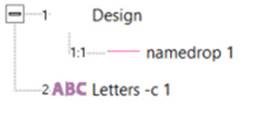
Lettering used with templates has optional parameters, depending on the template object. You can add the parameter to the lettering name, ex: “letters –c 2”.
This example will cause the lettering to use the template object with a number 2 at the end of its name (ex:“baseline 2”) and also will center the design.
You can place all your template objects in one design, which is customary. As long as that design comes before the lettering designs in the sequence, the template items will be found. You do not need to have the template objects in any order; the sequence of the lettering designs controls the sewing order. All that matters is that the index numbers in the names match.