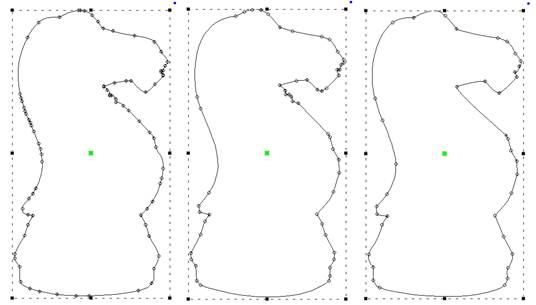
The menu Create > Outlines has Reconstruct Outlines to take vector shapes and try to recreate them with fewer points. If you’ve brought in something traced from a bitmap, it may have vector nodes every mm or so, making an impossibly ugly outline. Copy and paste a new one directly over the original. Sometimes it is useful to lock the original so as to avoid selecting/moving/editing it by accident.
Reconstruct Outlines on the copy. This will reduce many nodes, but they’ll probably not be exactly what you want. You can now edit, and even reconstruct again, to get a clean vector shape. Use the original that you’ve locked in place as a reference shape. Once your new shape is clean, delete the original.
Left: original, Middle: After Reconstruct, Right: With minor edits