As you add fonts to your system, you’ll no doubt discover the need for a better method to search and select your fonts. The library window will help. It provides access to the fonts by search string, size, type (native or imported), designer (installed folder) and category tags that you create. You can even quickly access your favorite fonts.
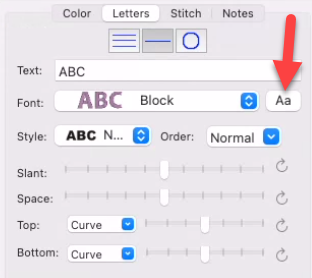
To access the Fonts window, create a lettering design and look at the property page for it.
Font Property Page
Here, you will see the button, labelled “Aa”, that will reveal the Fonts window. In systems without access to the Font Library feature, the button remains the ‘?’ which is used to display the characters contained in the font. The Fonts window will now provide that functionality and more.
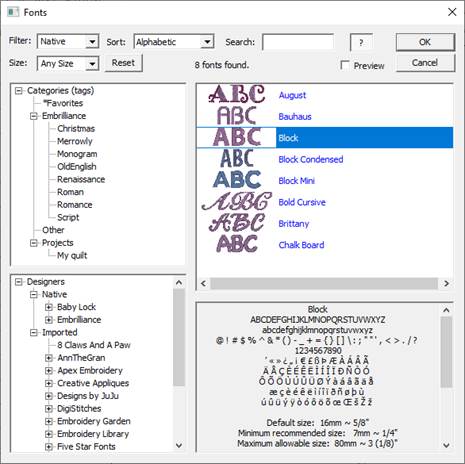
The Fonts window.
The Fonts window has five main sections:
1.) The controls at the top.
2.) The splitters between window sections, allowing you to view more or less in a section.
3.) The Categories, on the left.
4.) Fonts In Use, if any, are shown as a category.
5.) The Font List on the right.
6.) The character map of the selected font, bottom right.
7.) The Designers, below Categories.