Welcome to The Density Repair Kit, the most sophisticated
density adjustment and analysis tool available for the embroiderer! DRK does the
following:
•
Removes
hidden stitches from within a design so that it will sew thinner, cleaner, and
with less thread (and needle) breakage.
•
De-Clumps
design areas. These are areas that are over-sewn repeatedly with the same
color.
•
Filters
small stitches from your designs that would otherwise create thread build-ups
and jam the machine.
•
Reduce the
density in designs that were shrunk to fit a hoop.
•
Increase the
density of designs for better coverage.
•
View the
density of designs to see how they’ll sew before expending time and thread on a
trial.
•
Limits the
density of your designs based on the fabric and thread that you are using.
•
Informs you
of how best to embroider the project or fabric that you are working on. It
recommends stabilization, hooping technique, needle type and size, and thread
weight to help your project succeed.
•
Saves you
time and money. Reduced stitch counts save enormous amounts of time and thread
usage. Proper density adjustments allow projects to complete successfully. With
DRK, project time and thread savings of 15%-30% are common!
Have you ever had a design come out bad? Of course, we all
have. That’s why DRK was created. DRK cleans up embroidery designs that are too
dense or poorly digitized for your project.
How? Like its name implies, DRK has a set of tools to adjust
the density of embroidery designs. These tools help you embroider with greater
ease. You can alter the density of any design, and make that design work
on virtually any project or fabric type.
It does this by asking you what you are going to be sewing on,
and then it analyzes the density of your embroidery design and adjusts it.
Now, you’re probably wondering if it takes an embroidery
instructor camped out a week at your house to get you up and running. No, it
doesn’t. You can have the program do everything automatically or you can control
it manually. Running DRK is easy.
A Side Effect of DRK
By reducing the number of stitches that are in a design, DRK
saves you an incredible amount of time. Even with today’s fast-stitching
machines, 10,000 stitches are still around ten minutes. The thread savings, the
number of bobbins saved, and the frustration of failed embroidery all add up!
Imagine tackling a project and knowing that it will sew okay before you even
start!
If you’re intrigued, please read on.
 The
Density Map is a graphical display of the density, or stitches-per-inch in your
designs. To see the Density Map, click the button on the main toolbar. This is
useful to see if a design is not going to sew well. For instance, this is a
design that has been overlapped, thus its density is very high.
The
Density Map is a graphical display of the density, or stitches-per-inch in your
designs. To see the Density Map, click the button on the main toolbar. This is
useful to see if a design is not going to sew well. For instance, this is a
design that has been overlapped, thus its density is very high.
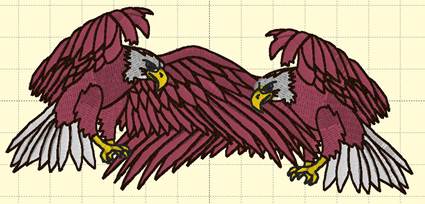
Like weather radar, the density map shows areas where
trouble is likely:
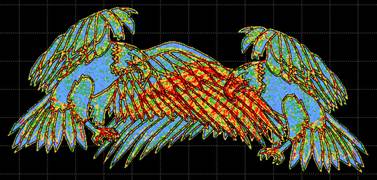
Where the design shows bright
red in color, there are six layers or more of thread, which undoubtedly will
produce poor embroidery results.
The Density Map can be used to illustrate when a design
(probably from the internet) is dangerous to sew on a project without test
sewing it first. And it also helps identify when you would want to use the
Remove Hidden Stitches function or even the Sweep. Those features will remove
stitches that are likely to cause poor design production, while maintaining the
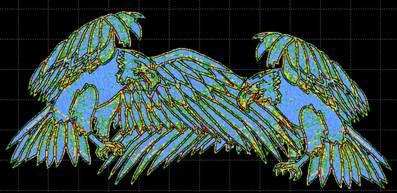
same visual design. Here is the same design after a Sweep is performed:
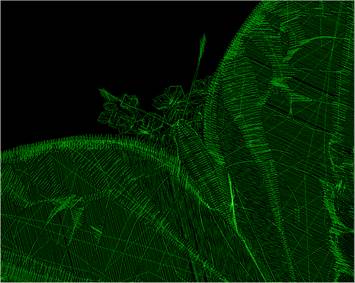
The WireLine Density Map is like an x-ray of your design,
allowing you to see through the layers of stitching to analyze those under-
neath. It helps to see the relationship of padding stitches, as well as how a
design has been compensated. You can view the whole design or individual colors
to better see what’s going on inside your design. Zooming in the WireLine allows
you to get up-close and personal with the stitches to see how they were
digitized. When determining which colors to remove hidden stitches from, the
Wire- Line Density map is your best analysis tool. And, in addition to all the
above, it looks really cool.
Stitch Properties
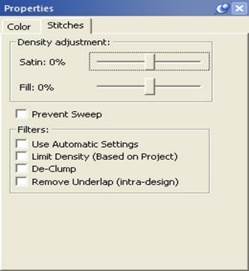
The DRK version of Embrilliance allows for more control of the
stitches using our Project system. The Stitches property tab adds controls to
use the project settings from the Project Advisor to remove stitching, De-Clump,
and limit the density.
Density Tuning
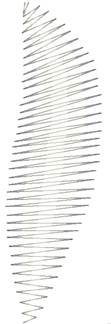
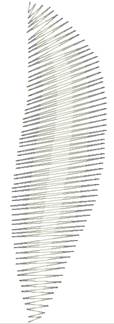
DRK has a density tuning control that lets you adjust the
stitch count of your file while keeping it the same size. As the program
adjusts the stitches it will also keep the pattern fills intact.
By moving the density tuning control slide + or - 25% you can
easily adjust the density.
After reducing a design to fit your hoop, DRK can alter the
density according to the new size of the design.
Another use for the density tuning is to increase the coverage
that a design gives. For instance, using puffy foam under an area of satin
stitches in a design that wasn’t originally intended for it can now be
accomplished by increasing the satin fill density for that color. Or if you are
embroidering a towel, and want better coverage to keep the loops in the terry
cloth from popping through, simply increase the Density Tuning slider.