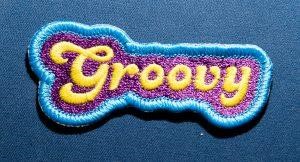
Merrowly is a part of the Embrilliance Platform, a suite of products that operate within one program interface on Mac and Windows PCs.
Everyone loves patches. We collect them to show where we’ve been, what we enjoy, and who we are, inside and out.
Merrowly is a versatile software tool and an extensive collection of resources to allow you to create beautiful patches.
Merrowly is based on a program machine embroidery stitch that can emulate an overlock, or merrowing, on the edge of a patch. The patch edge has been a standard for over 100 years, and has a distinctive look. When you have a Merrowly patch in your hand, you feel as though this was made with traditional tools and skill on the overlock. The amazing part is that you can use only an embroidery machine, thread and stabilizer to get one-of-a-kind patches.
A basic feature list includes:
•Merge and save machine embroidery design files from virtually any source.
•Export cut-files.
•Create patch edges to wrap a page, as a circle/oval, square/rectangle with adjustable corner radius.
•Use pre-made patches or choose from well over 100 shapes in the included Library.
•Includes two sets of fonts: Uniform/Block small + micro and 60wt. and Fun fonts for name patches or any other embroidery use.
•Color Sort for multiple-patch layup.
•Create objects compatible with StitchArtist 3.
Merrowly comes with patch shapes that have been used on commercial uniforms for many years. These shapes are the same size and aspect ratio as you would expect when creating police, fire and military patches for actual use by responders. Included are rockers and namedrop templates for ease of use.
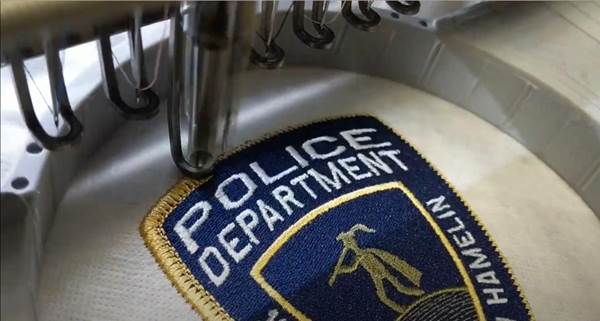
Merrowly also comes with two sets of fonts: One set is designed for those uniform pieces, and the other is for fun. Uniform patches often require official versions of block text, specifically chosen to match a style guide or service. In embroidery, the designer can often use a nearest-matching font and adjust single letter shapes as needed. In this set, however, there are not only block fonts, but sets of fonts with mini and 60wt small versions. And there are several United States military branch fonts included, designed to fit the style guide of those branches.
For fun, there is a collection of fonts with various styles from swirly, retro to motorcycle. One major benefit of this set is that a patch can be made, one that exactly outlines a name made using the fonts.
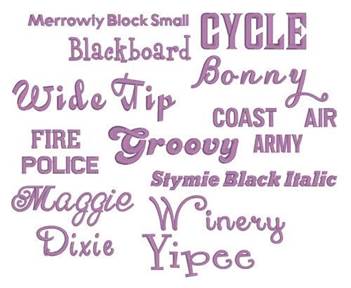
Included fonts
Merrowly can automatically create a patch for anything on the design page. With a single menu selection (Utility > Add Patch Edge) you can automatically wrap the page designs in a custom shaped patch edge or a circle, rectangle or rounded rectangle (with adjustability).
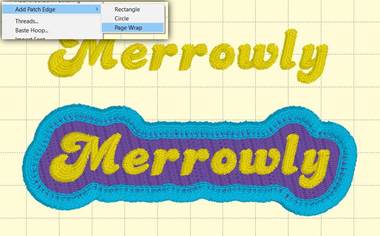
Page Wrap function from Utility menu
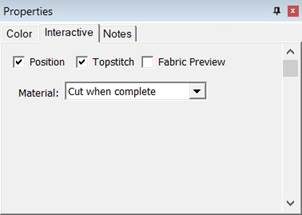
Properties for patch edge
If you are unfamiliar with the Embrilliance Platform itself, please do read the help or manual (same content.) It will explain things like serial numbers and how they activate different parts of the program.
When the program runs, it checks your serial numbers to see what products are licensed. If none are, this is a free mode called, ‘Express’ which will also present a window for you to enter a serial number if you have one. Here, you type in your Merrowly serial number. If you already have serial numbers in the Platform, use the Help menu > serials to add the number. You will have to restart the program (not the PC).
Merrowly contains a lot of content; designs, fonts, etc. which take up some space. As such, that content is not all installed with the Platform. You will need to use the Embrilliance downloads page to get the installer for that content. It will come as an Embrilliance installer file with the .BX extension. You may have seen that on many fonts sold by nearly everyone in the industry.
Once installed and run with the serial number, Merrowly adds a command to the File menu > Export Outlines which is used to save a cut-file for the patch shape. There is also the Utility menu which includes Add Patch Edge with three options for Circle/Rectangle/Page Wrap. In the Library the Embrilliance: Merrowly collection will be added with several sets of designs, sorted by shape or utility.
Knowledge of the basic construction of a patch is necessary. A patch will consist of some optional steps:
•Position: Use this to establish where in the hoop the patch will be embroidered. Any applique would normally fully cover this stitch. Position stitches can also be used on fabric to create cutlines so that the fabric can be hand-cut into appliques.
•Material: When an applique fabric has been placed, it will be anchored with stitches.
•Topstitch: The actual faux-overlock edge of the patch.
•Design elements: Any names or designs of your choosing that will be contained in the patch.
For many, if not most, cases, the entire patch steps can be completed before the design elements. For beginners, this is the recommended method. When making patches, try to use designs that are lightly stitched.
If you think your design will pull the completed patch away from the stabilizer, you can sew the topstitch of the patch edge as a final step. To do this, wait until your design is complete, then copy the patch design. Paste it. This will place it over top of the original, but it will be the final design in the sewing sequence. Then you can adjust the properties of the patch to cause the final one to sew only the edge, and have the initial one not sew that edge. This ability to make patches in 2 steps, with the design elements between, does mean that the patch may shift slightly in the hoop before the final stitch, and registration could be an issue. You’ll have to look closely at it, or simply try it.
Merrowly provides a controlled Interactive design for the patch. Construction styles are selectable.
•Freestanding: Patches can be made from only thread with a freestanding background on an appropriate stabilizer (wash-away, vinyl, etc.)
•Directly on yardage: Simply embroider as normal and cut or hot-cut later.
•Applique: Traditional methods can be used. You can also save a cut-file or .svg to allow for electronic cutting. If you do not have the perfect color fabric, Merrowly has the option to add a light sketch-style fill for color and texture to the background of the patch.
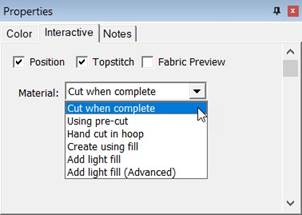
Options for patch