
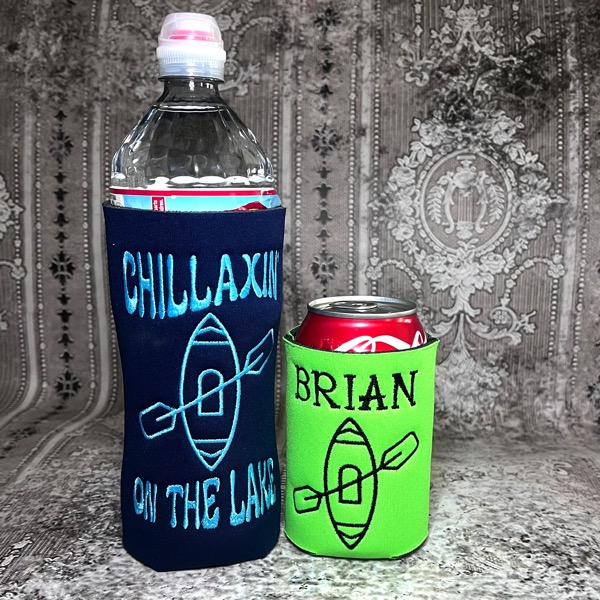
For the birthday of Embrilliance’s creator and head innovator, Brian Bailie, our own Lisa Shaw whipped up a project that exemplifies the rest and relaxation we want for him as he hits the lake! What better than a couple of cozies to keep beverages as chill as he should be when the water beckons. She decided to add some wild and wavy text from ACE-1: The Rewind and Font Collection 2 to a simple kayak design our friend Erich Campbell digitized to honor Brian’s birthday. As a one-color, quick-stitching, icon-style embroidery design, it lends itself to all sorts of projects for your kayak-loving friends and family.

Neoprene Stitching Tips:
- Use a basting box to attach the flat can cooler to the stabilizer. This can be found under the Utility menu of Essentials – Utility > Baste design. To see this in action, check out this video.
- Choose “meaty” designs that will not get embedded into the neoprene. The stitches will sink so in general you want to choose wide satin or fill stitch designs. That said, a running stitch design can add texture. The relief caused as the neoprene is held down by the stitching can provide more visual interest more than the thread in the design. This is a great chance to be creative with texture!
- Use a wash-away topping to help the stitches be more prominent and stay closer to the surface of the neoprene.
- Use thicker fonts and Native BX fonts allow you to adjust not only the density and compensation but also the underlay type with inset and density. Increasing your density, adding pull compensation to widen the columns, and using more structure in your underlay can help your text stand up and stand out. Experience will help you choose the correct settings for your projects, and you gain experience by doing a test sew! If you’ve never used neoprene, consider getting extra blanks or material to test your initial settings.

The font used on the water-bottle pictured is ACE Joplin from ACE-1: The Rewind, while the font pictured in the can cozy from this project is Mel Script from Font Collection 2
The design is provided in our native .BE format, enabling you to save a stitch file for any embroidery machine. If you aren’t already an Embrilliance owner, we provide a free method to use our software called Express Mode. It will not only allow you to use any of the wonderful free designs found in our project blog, but also lets you install and create basic text treatments with fonts distributed in our popular .BX format produced by many embroidery design creators.