
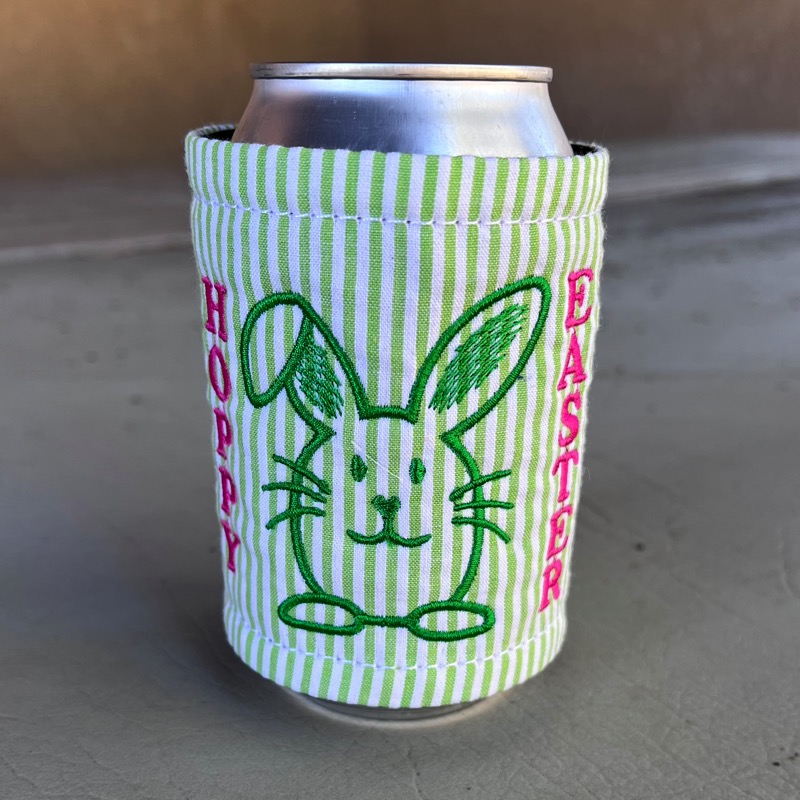

If you’re looking for a project that stitches fast and delivers that “Oh my, that’s adorable!” reaction, this little egg bunny is the one. It’s simple, versatile, and it’s one of those rare designs that suddenly has you finished with five more fun projects than you expected. (Ask me how I know!😄).
Perfect Project Ideas
This little guy is surprisingly flexible! We are sure that you will find more than a few projects for which he’s the perfect fit, but here’s a few that make sense to our team of stitchers.
- 🧺 Easter Basket Name Panel
Add this bunny with a name to a basket or bag and suddenly you’ve got a custom egg-carrier that looks boutique-level fancy. - 🍼 Baby Bottle Wrap / Koozie
Like the sample—cute, functional, and keeps little hands comfy. - 🍽️ Table Linens
Napkins, placemats, or runners stitched with a few of these cute bunnies scattered around = instant fun for your Easter table. - 🎁 Gift Add-Ons
Stitch on a fabric tag or wrap for that handmade finishing touch to your Easter presents.
Perfectly Personalized in No Time

Here’s where you can take this design from another “cute concept” to “fully personalized and fabulous” in about 30 seconds.
✔️ The Quick Steps:
- Add a letters object in in Embrilliance Essentials by clicking the Create Lettering button.
- With the Letters object selected, go to the ‘Letters’ tab in the Properties window and select Vertical from the style drop-down menu as shown above.
- Position your text beside your bunny.
- Resize as needed to fit your project.
That’s it. No fancy tricks, no extra tools—just a simple lettering style selection doing all the work.
For more information on using lettering tools in Essentials, check out our awesome YouTube playlist on the lettering tools here!
Pro Tips:
💡 Create your first lettering object as directed above, then copy, paste, and edit the new Letters object to start with the same size and settings for additional lettering objects.
💡Vertical text behaves best when using ALL CAPITAL LETTERS and clean, satin-stitch fonts.
👉 This is where the ACE Barrel font (included in Embrilliance Essentials) really shines; It’s bold, readable, and holds up beautifully when stacked vertically.
Lowercase letters can look a little confused and ready to topple when standing atop each other. Capitals, however, look confident and organized. Stacked caps look like they are living their best life.
💡 Need to ALIGN & DISTRIBUTE your objects? Check out the education in last month’s blog post for details!
The design is provided in our native .BE format, enabling you to save a stitch file for any embroidery machine. If you aren’t already an Embrilliance owner, we provide a free method to use our software called Express Mode. It will not only allow you to use any of the wonderful free designs found in our project blog, but also lets you install and create basic text treatments with fonts distributed in our popular .BX format produced by many embroidery design creators.